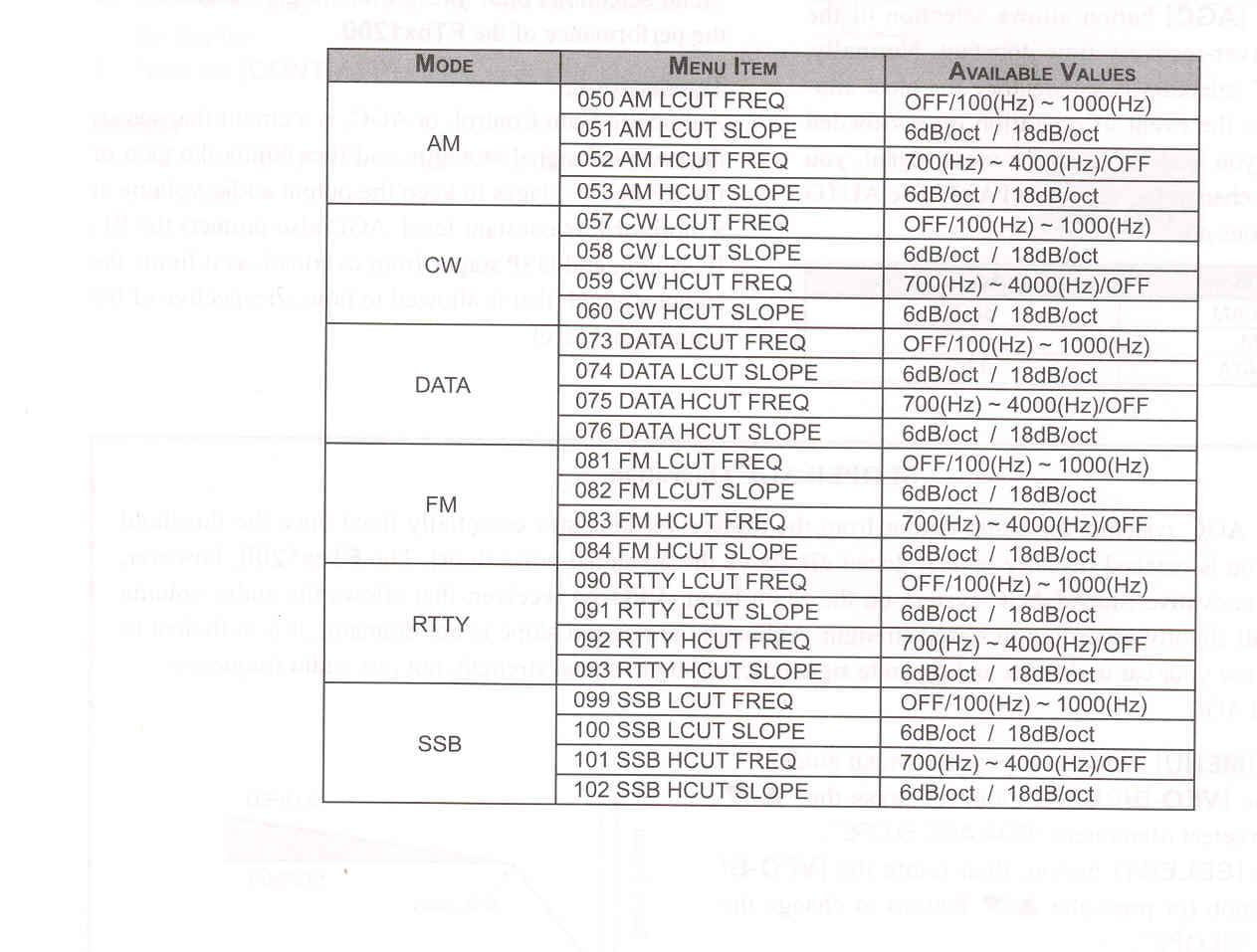
2. Rotate the [VFO-B/CLAR] knob (or press the [▲/▼] button) to find Menu items "050" through "053". These parameters apply to the adjustement of the receiver audio filter in the AM mode, Menu items "057" through "060" apply to the adjustment of the RX audio filter in the CW mode, Menu items "073" through "076" apply to the adjustment of the RX audio filter in the DATA mode, Menu items "081" through "084" apply to the adjustment of the RX audio filter in the FM mode, Menu items "090" through "093" apply to the adjustment of the RX audio filter in the RTTY mode, and Menu items "099" through "102" apply the the adjustment of the RX audio filter in the SSB mode.
3. Press the [SELECT] button.
4. Rotate the [VFO-B/CLAR] knob (or press the [▲/▼] button) to adust the receiver audio response as desired.
5. Press the [SELECT] button, then press the [MENU] button to save the new setting and exit to normal operation.